PROJECT — Procurement & Contracts (GovTech)
E-Catalogue
A secure platform for managing post-contract procurement activities, from product catalogs to complex administrative workflows.

Role
UI Designer & Developer
Platform
Desktop Web Application
Users
Public Sector Buyers,
Service Providers/Vendors
Year
2017-2018
Overview
E-Catalogue is a secure web platform developed by the Estonian Centre of Registers and Information Systems (RIK) for managing post-contract procurement activities, where authenticated users can log in to view, search, sort, and interact with contracts and related products/services tied to their role in public procurement workflows. The system supports role-based access, detailed contract and item views, advanced filtering, and data export functions, enabling both buyers and suppliers to efficiently handle contract details, product/service catalogs, and related administrative actions within an Estonian e-procurement ecosystem.
- → Hybrid UI Designer & UI Developer, contributing across design and implementation
- → Designing low- and high-fidelity prototypes in UXPin, iterating based on stakeholder feedback
- → Implementing UI using HTML, CSS, JavaScript, and Angular, with customized Bootstrap components
- → Collaborating closely with an IT Business Analyst to translate user stories into clear visual solutions
My Role
This was my first project in a UI Designer role. I worked as a UI Designer and Developer on E-Catalogue, translating evolving business requirements into clear, usable interface structures for a complex, data-heavy system. Working closely with a Business Analyst and initially supported by a Senior Designer, I took ownership of designing and iterating key views and made layout decisions for core workflows such as orders, offers, and contracts, defining consistent list, table, and action patterns.
Design Challenges
How might we...
..structure data-heavy views so users can move confidently from overview to detail and back again?
..design the interface to clearly communicate progress, status, and ownership across contracts and orders?
..enable users to find and access relevant data efficiently within large and complex datasets?
Translating early user stories into concrete, discussable interfaces allowed the information architecture to evolve alongside the product definition.
UI Design and Development
I designed and prototyped UI views in parallel with ongoing business analysis, at a stage when the full product structure was still emerging. Then, I translated early user stories into concrete, discussable interfaces, giving the team shared visual references. As understanding deepened, layouts and view structures were iteratively refined, allowing the information architecture to evolve alongside the product definition.
Interface Review
Early structure reflected uncertainty
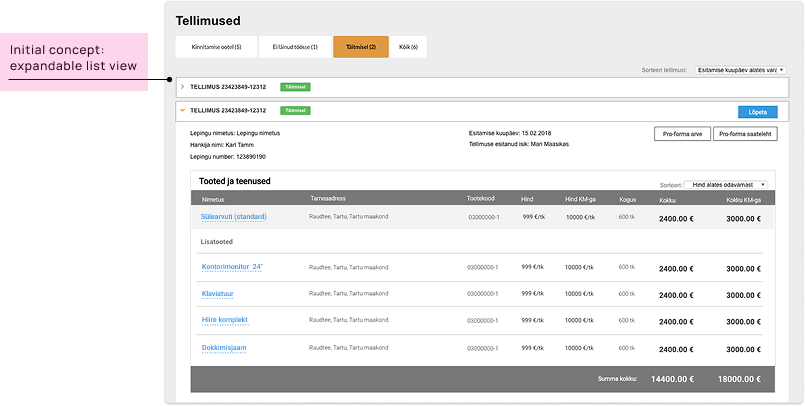
The interface was initially designed while the product structure and requirements were still evolving and being defined.
As requirements evolved
As the requirements became clearer, it became evident that each order contained large, complex tables and detailed interactions that exceeded what could be effectively handled within a single, expandable list view.
Later structure reflects clarity
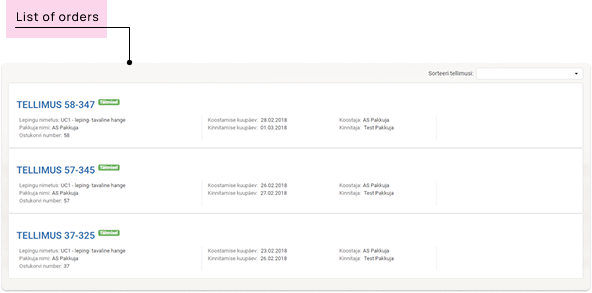
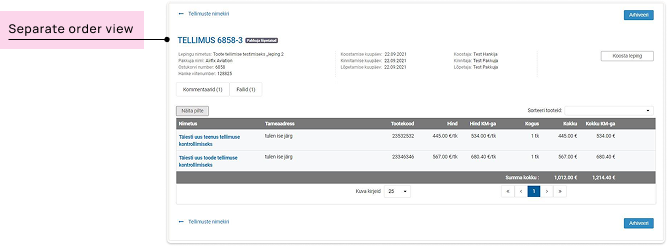
To improve clarity and usability, I restructured the interaction model from a single-page accordion layout to a list-detail approach:
a simplified list of orders, with each order opening into a dedicated view for detailed inspection and actions.
This shift reduced visual overload, allowed more space for complex data, and created a clearer navigation model aligned with user workflows.
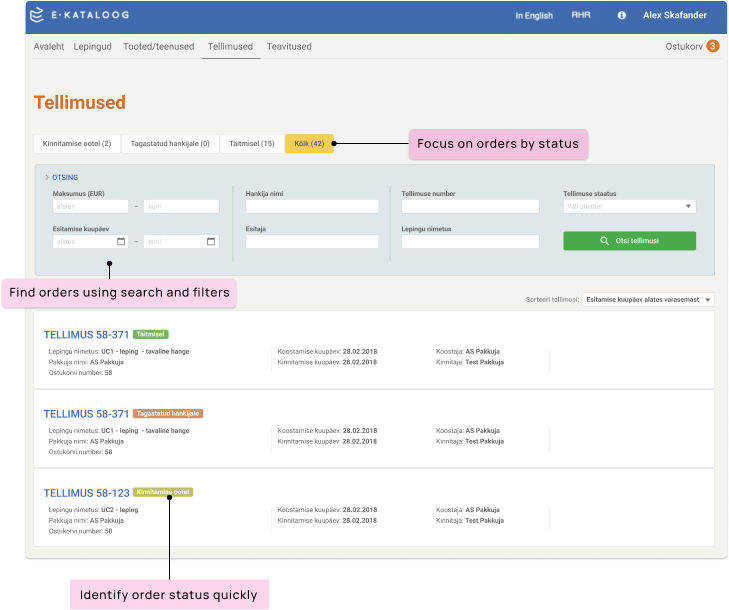
Making progress status visible and data accessible
The orders view combines structured search, filtering, and clear progress status indicators to support both quick access and understanding of ongoing work.
Each order includes a clearly visible status indicator directly within the list, enabling users to understand progress at a glance without opening the detail view.
Outcome
-
Made information findable, understandable, and actionable
The UI structures data so it becomes easy to find, understand, and act upon.
-
Enabled both overview and detailed management
Users maintain a clear overview of contracts, products, and orders, while efficiently managing data throughout the contract lifecycle.
-
Improved scalability of data-heavy interactions
Shifting from dense, single-view layouts to a list-detail pattern created space for large datasets and clearer task-focused workflows.
Transformed complex procurement data into a clear, navigable system that supports both oversight and detailed operational work.